As a web designer, your primary goal is to create visually stunning and user-friendly websites. But in today’s digital landscape, that’s no longer enough. To truly succeed, you need to understand and implement SEO-friendly website design principles.
In this comprehensive guide, we’ll explore 15 powerful SEO tips for web designers that will help you optimize website design for search engines and boost your clients’ rankings in 2024.
Importance of SEO for Web Designers
Before we dive into the specific tips, let’s briefly discuss why SEO is crucial for web designers:
- Increased visibility: SEO-optimized websites rank higher in search results, attracting more organic traffic.
- Better user experience: Many SEO best practices align with good user experience design.
- Competitive advantage: Offering SEO expertise sets you apart from other designers.
- Long-term success: SEO-friendly designs help websites perform better over time.
Best SEO Tips for Web Designers
Are your web designs SEO-friendly? 🤔 Swipe up to read our blog post on essential SEO tips for web designers. Learn how to create websites that look amazing and rank well in search results!
Table of Contents
1. Prioritize Mobile-First Design
With Google’s mobile-first indexing, it’s crucial to design websites with mobile users in mind:
- Use responsive design techniques
- Ensure fast loading times on mobile devices
- Implement touch-friendly navigation
- Optimize font sizes and button placement for mobile screens
Example: Design a restaurant website where the mobile version features a prominent “Order Now” button at the top of the screen, easy-to-read menus with collapsible sections, and a click-to-call function for reservations.
2. Focus on Page Speed Optimization
Fast-loading websites rank better and provide a superior user experience:
- Compress images and use modern formats like WebP
- Minimize HTTP requests
- Leverage browser caching
- Use a content delivery network (CDN)
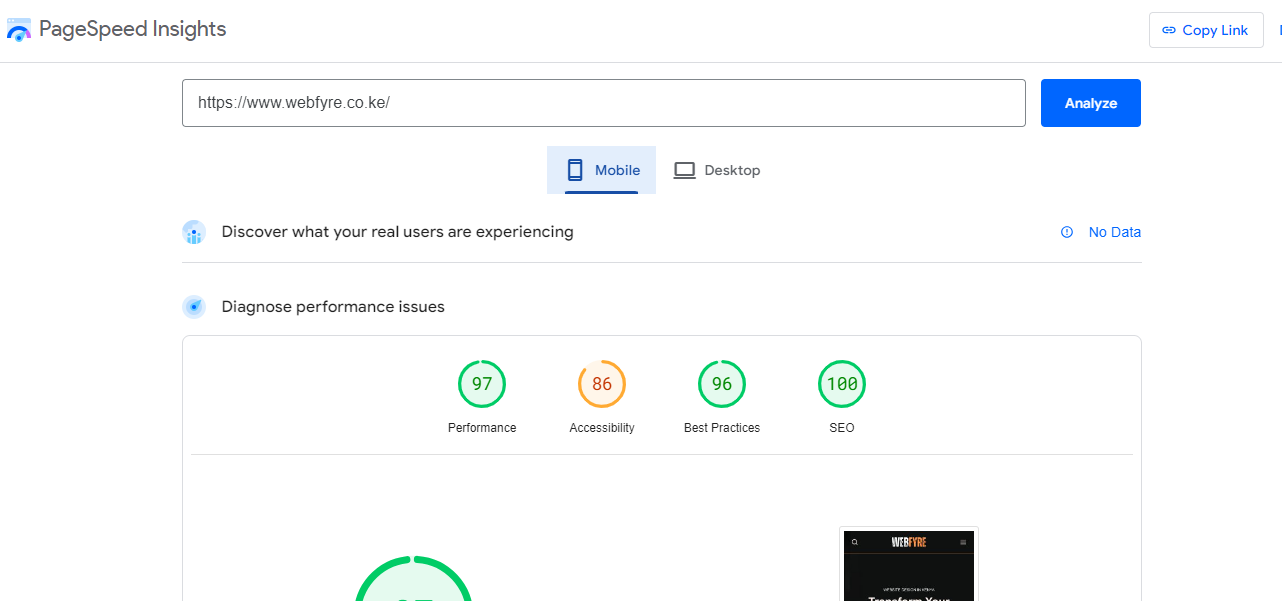
Example: For an e-commerce site, implement lazy loading for product images below the fold, use WebP image format, and minify CSS and JavaScript files to reduce load times from 5 seconds to under 2 seconds
3. Implement a Clear and Logical Site Structure
A well-organized website helps both users and search engines navigate your content:
- Create a logical hierarchy of pages
- Use breadcrumbs for easy navigation
- Implement a clear and descriptive URL structure
- Limit the depth of your site structure (no more than 3 clicks from the homepage)
Example: For a law firm website, create a structure like:
- Home
- Practice Areas
- Criminal Defense
- Family Law
- Personal Injury
- Attorneys
- Blog
- Contact
4. Optimize Header Tags (H1, H2, H3)
Proper use of header tags helps search engines understand your content structure:
- Use only one H1 tag per page, typically for the main title
- Structure content with H2 and H3 tags for subtopics
- Include relevant keywords in headers naturally
- Maintain a logical hierarchy (H1 > H2 > H3)
Example: For a blog post about “10 Summer Gardening Tips”:
H1: 10 Essential Summer Gardening Tips for a Thriving Garden
H2: 1. Choose Heat-Resistant Plants
H3: Best Flowers for Hot Weather
H3: Drought-Tolerant Vegetables
H2: 2. Implement Smart Watering Techniques
5. Create SEO-Friendly Navigation Menus
Well-designed navigation menus improve user experience and help search engines crawl your site:
- Use descriptive, keyword-rich anchor text
- Implement HTML menus instead of JavaScript or Flash
- Keep navigation simple and intuitive
- Include a sitemap link in the footer
Example: For a fitness website, use descriptive menu items like:
- Workout Plans
- Nutrition Guides
- Success Stories
- Fitness Calculator Instead of generic terms like “Services” or “Resources”
6. Optimize Images for SEO
Images play a crucial role in both design and SEO:
- Use descriptive, keyword-rich file names
- Add alt text to all images
- Compress images for faster loading
- Implement lazy loading for images below the fold

Example: For a travel blog post about Paris, name an image “eiffel-tower-sunset-paris.jpg” instead of “IMG_12345.jpg”, and use alt text like “Eiffel Tower silhouette against a colorful Parisian sunset”
7. Implement Schema Markup
Schema markup helps search engines understand your content better:
- Use appropriate schema types for different content (e.g., articles, products, events)
- Implement schema for local businesses when relevant
- Use schema to highlight important information like ratings and prices
- Test your schema implementation using Google’s Structured Data Testing Tool
Example: For a recipe website, use Recipe schema to highlight:
- Cooking time
- Ingredients
- Nutritional information
- Recipe rating
8. Design for Featured Snippets
Creating content that’s optimized for featured snippets can significantly boost visibility:
- Use clear, concise definitions for key terms
- Create numbered or bulleted lists for processes and lists
- Implement tables for comparison data
- Use heading tags to structure content in a Q&A format
Example: Create a “What is SEO?” page with a clear definition in the first paragraph: SEO (Search Engine Optimization) is the practice of optimizing a website to increase its visibility and ranking in search engine results pages (SERPs) for relevant keywords and phrases.
9. Focus on Core Web Vitals
Google’s Core Web Vitals are crucial for both user experience and SEO:
- Optimize Largest Contentful Paint (LCP) for faster loading
- Improve First Input Delay (FID) for better interactivity
- Minimize Cumulative Layout Shift (CLS) for visual stability
Example: Improve a news website’s Cumulative Layout Shift (CLS) by setting fixed sizes for ad spaces and image placeholders, preventing content from jumping as the page loads.

10. Implement Internal Linking Strategies
Effective internal linking helps distribute page authority and guides users through your site:
- Link related content naturally within your copy
- Use descriptive anchor text for internal links
- Create content hubs or pillar pages for key topics
- Implement a “related posts” section for blogs
Example: In a blog post about “Beginner’s Guide to Yoga”, include natural links to related content like “10 Best Yoga Mats for Beginners” and “Understanding Different Types of Yoga”.
11. Optimize for Local SEO
For businesses with physical locations, local SEO is crucial:
- Include location-based keywords in content and meta tags
- Implement schema markup for local businesses
- Design a prominent and consistent NAP (Name, Address, Phone) section
- Create individual pages for multiple locations
Example: For a dental practice website, create individual pages for each location with unique content, embedded Google Maps, and schema markup including the practice name, address, and phone number.
12. Design for Voice Search Optimization
With the rise of voice assistants, optimizing for voice search is increasingly important:
- Focus on natural language and long-tail keywords
- Create FAQ sections to target common voice queries
- Optimize for featured snippets and “People Also Ask” sections
- Ensure your website is mobile-friendly
Example: Create an FAQ section on an electronics e-commerce site with questions like “How do I choose the right smartphone?” and provide concise, conversational answers.
13. Implement SSL Certification
Secure websites are favored by both users and search engines:
- Install an SSL certificate for HTTPS
- Redirect all HTTP traffic to HTTPS
- Update internal links to use HTTPS
- Implement HSTS (HTTP Strict Transport Security)
Example: Instead of http://webfyre.co.ke/, https://webfyre.co.ke/ displays in the browser’s address bar, enhancing security and user trust.
14. Create a Custom 404 Page
A well-designed 404 page can improve user experience and reduce bounce rates:
- Design an on-brand, helpful 404 page
- Include navigation options to key pages
- Add a search bar to help users find content
- Consider adding popular content links
Example: Design a 404 page for a pet supply store that features a cute animal image with the text “Oops! This page has gone for a walk. Try these popular categories:” followed by links to top product categories.
15. Optimize for Social Sharing
While not a direct ranking factor, social signals can indirectly impact SEO:
- Implement Open Graph tags for better social sharing
- Design visually appealing social share images
- Include easy-to-use social sharing buttons
- Create content that encourages social engagement
Example: For a fashion blog, create custom Open Graph images for each post featuring the article title overlaid on a relevant fashion photo, sized perfectly for Facebook and Twitter sharing.
Best Practices for Implementing SEO in Web Design
To effectively incorporate these SEO tips for web designers into your workflow:
- Collaborate with SEO specialists early in the design process
- Use SEO-friendly CMS platforms and themes
- Regularly audit and update your designs for SEO improvements
- Stay informed about the latest SEO trends and algorithm updates
- Test your designs across multiple devices and browsers
By following these web design SEO best practices, you’ll create websites that not only look great but also perform well in search engine rankings.
FAQs About SEO for Web Designers
Q: How important is mobile optimization for SEO?
A: Mobile optimization is crucial for SEO. With Google’s mobile-first indexing, websites that aren’t mobile-friendly may see a significant drop in rankings.
Q: Can JavaScript-heavy designs negatively impact SEO?
A: While Google has improved its ability to crawl JavaScript, heavy reliance on JavaScript can still pose challenges for SEO. It’s best to use JavaScript judiciously and provide fallbacks for search engines.
Q: How often should I update my website’s design for SEO?
A: While there’s no set frequency, it’s a good practice to review and update your design annually or whenever major SEO best practices change. Regular small updates can also be beneficial.
Q: Are there any design elements that can harm SEO?
A: Yes, elements like intrusive interstitials (pop-ups), hidden text, or excessive use of images instead of text can negatively impact SEO. It’s important to balance design aesthetics with SEO best practices.
Conclusion: Elevate Your Web Design with SEO Best Practices
Incorporating these SEO tips for web designers into your workflow will not only improve your clients’ search engine rankings but also enhance the overall user experience of the websites you create. By focusing on SEO-friendly website design, you’ll deliver more value to your clients and set yourself apart in the competitive web design industry.
Remember, SEO is an ongoing process, and staying up-to-date with the latest trends and best practices is crucial. Continuously educate yourself and be prepared to adapt your designs as search engine algorithms evolve.
Ready to take your web design skills to the next level? Start implementing these SEO tips in your next project and watch your clients’ websites climb the search engine rankings!
Share your experiences with implementing SEO in your web designs in the comments below. What challenges have you faced, and what tips have worked best for you? Let’s learn from each other and grow as a community of SEO-savvy web designers!